CygNet Host Manager Utility
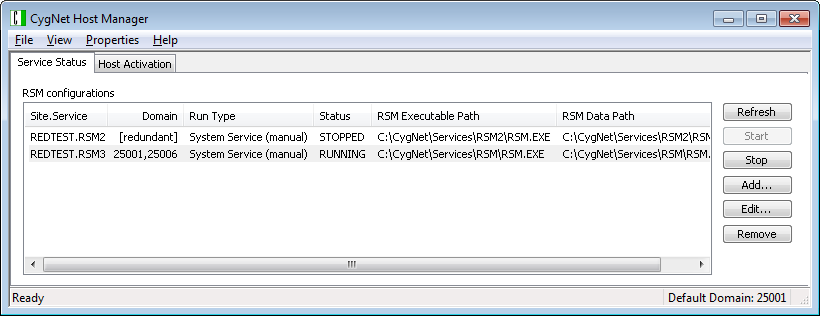
The CygNet Host Manager utility (CHostMgr.exe) is the primary CygNet utility for managing services and domains on a host server. The utility controls the Remote Service Manager (RSM) service for each domain(s), identifies redundant RSMs running on multiple domains, and each RSM respectively starts and stops all of the services listed in its database, including the Address Resolution Service (ARS).
CygNet Host Manager also provides methods to modify RSM settings (location, Domain ID, run type, start up type, and log on account), change network settings (default Domain ID, ARS address), change start-up options (start all RSM services when starting Host Manager, start up with a timed delay, hide the Host Manager, and logging and tray balloon notifications setting), select service IP address, configure RUDP fragmentation settings, and perform host activation. The utility can be used if the services are running as either a system service or a user process.
|
CygNet Host Manager Utility |
To Start CygNet Host Manager
CygNet Host Manager is stored in the CygNet\Utilities folder (CHostMgr.exe) on the host server. The CygNet services setup program adds a CygNet Host Manager shortcut to the Start menu, as well as to the Startup group.
- Click Start > CygNet Host Manager to start the utility.
When CygNet Host Manager is running, it shows as a minimized icon in the system tray. To maximize the utility, double-click the icon.
|
Host Manager Utility Icon |

CygNet Host Manager does not need to be running while services are running. The following CygNet Host Manager icon color variations provide information at a glance about the state of the services.
| Color | State |
|---|---|
|
|
Services are running |
|
|
Services are stopped When using CygNet Host Manager to control more than one set of services, if one of the service sets is stopped, the system tray icon displays in red |
|
|
Services are changing state
|
 Green
Green Red
Red Yellow
 Gray
GrayTo Exit CygNet Host Manager
To exit CygNet Host Manager, do one of the following.
- From the task bar, right-click the CygNet Host Manager icon to access menu options and then click Close window.
- From the CygNet Host Manager window, click the File tab to access menu options and then click Exit CygNet Host Manager.
Exiting the CygNet Host Manager utility does not affect service operation status.
User Interface
The following table describes the user interface and the many options available from this utility.
| Option | Description |
|---|---|
|
Menu bar |
The following menu options are contained in the File, View, Properties, and Help menus. File Menu
View Menu
Properties Menu
Help Menu
|
|
Service Status page |
The Service Status page lists all RSM services configured for this host and provides access to the following buttons and context menu options. Columns
Buttons
Context MenuRight-click any managed RSM in the list to access the functionality described above (for buttons) via a context menu. The following additional options are available via the context menu.
Redundant RSMsThe CygNet Host Manager utility identifies and displays redundant RSMs that might be running on multiple domains. The Domain column displays the following information for each RSM listed in the RSM configurations list:
If an RSM changes the domain on which it is running, the CygNet Host Manager will detect that information and automatically update the list of domains for the RSM. If the CygNet Host Manager is started when a redundant RSM is already running, it will immediately retrieve the list of domains from the RSM and display them in the list of RSM configurations. See Redundancy for more information. |
|
Host Activation page |
The Host Activation page shows the host activation code, host activation configurations, and the domain, key, and status for this host. See Activating a Host for more information about using CygNet Host Manager to activate hosts. |
More:
 Adding an RSM to CygNet Host Manager
Configuring the Service Address
Configuring Advanced Network Settings


